This is my boxed PC game collection as of 2016. I added some more games recently that aren't pictured. My big boxes are on a bookshelf and media cabinet, I put the small boxes on a smaller shelf.
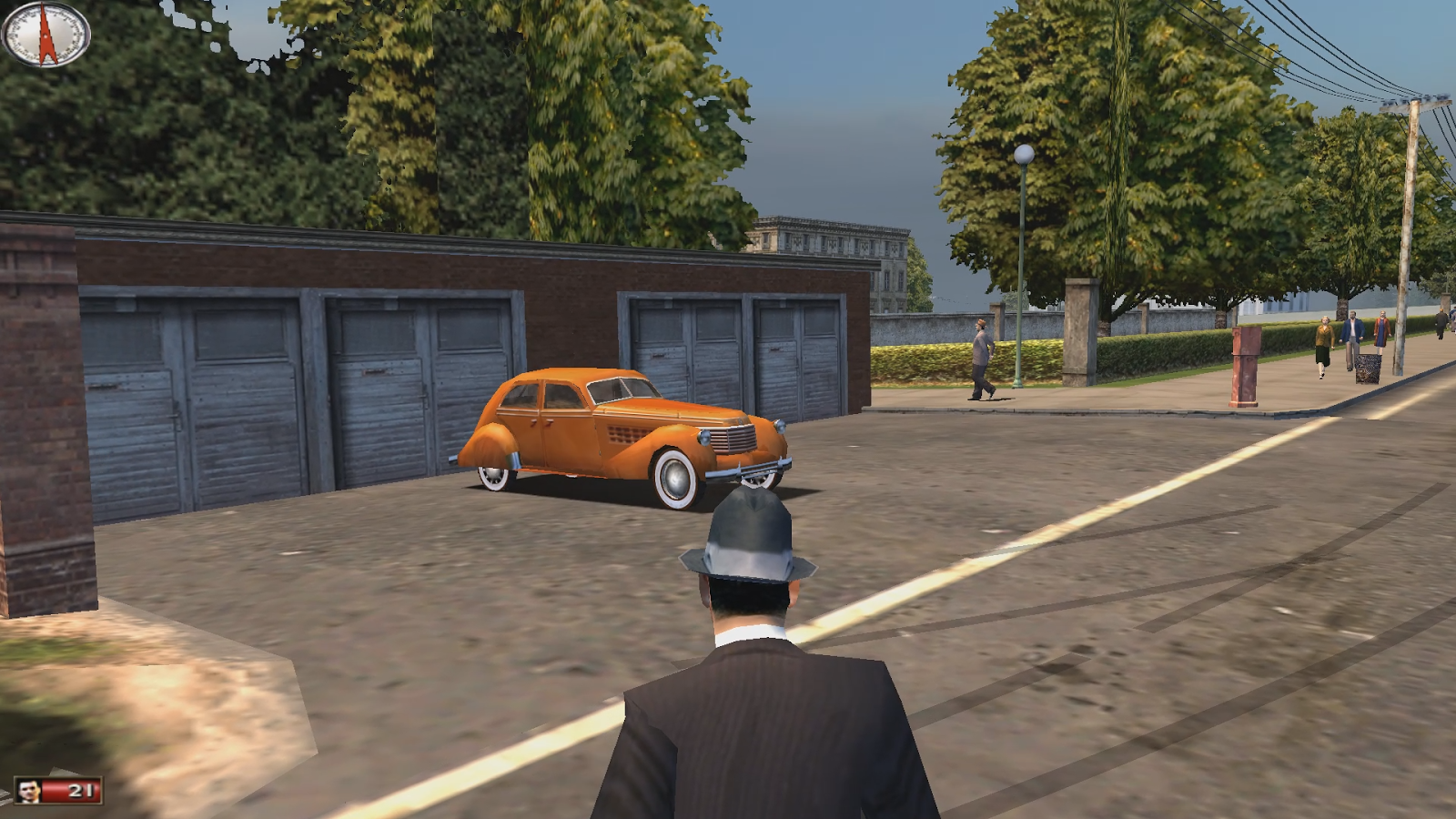
Mafia is one of the BEST PC games ever, capisce?! Mafia is a 3rd person shooter and open world driving game developed by Czech studio Illusion Softworks and released August 2002 on PC. Mafia was code named Gangster. It was originally going be a driving game similar to the game Driver with a multiplayer racing mode and set for release in 2000. Illusion was going to use the engine from their previous game Hidden and Dangerous, but it wasn't advanced enough so they created a new engine LS3D.
Mafia has a fantastic and memorable story, amazing graphics and sound, and great voice acting. It feels like you are playing a movie! The story and characters are really believable. The main character starts out as a young guy, he's a good person but makes some bad moral choices. The voice acting is excellent from the entire cast, a lot of the cast of the Sopranos lent their talent for Mafia.
Some players were turned off by the amount of driving and how slow some of the cars are. Your first car the Bolt Ace (Ford Model-T - There is a real car names mod) only has a top speed of 40 mph on a flat road, but down hill it is about 60 mph. The cars feel like they have a weight to them so when you go down hill your car will speed up a lot. The later cars you unlock are much faster. Mafia was released only 3 months after Grand Theft Auto 3 came out on PC, it had been 10 months since it's release on PS2. Comparisons were made to GTA3 but besides being an open world it shares little in common with GTA. It's a lot more realistic and more of a linear story based game. Cops will pull you over for going over 40mph, running red lights, and crashing your car. I crashed into a trash can and they pulled me over! It's not too difficult to outrun the cops even in a slow car, if you change cars the cops won't be able to find you. Mafia's engine allows for more realistic car damage than GTA3. Windows can be broken, headlights fall off, you can shoot out tires. Cars feature real time damage deformation. On my playthrough a cop car was hit by a trolly and looked flattened! In GTA3 cars simply catch on fire and explode.
You have to learn to lock pick cars in the game. There are 51 cars in the story missions and 19 bonus cars you unlock after completing the main game. You also need to refuel your car at gas stations. The game doesn't use money, it just shows the attendant pumping gas and you paying a fine when the police pull you over.
You play as taxi driver Thomas Angelo. The game takes place in the fictional city of Lost Heaven, a combination of San Francisco and Chicago. In addition there is also an expansive countryside to drive in ! The story spans from 1930-1938 during the Great Depression and the later part of prohibition. In 1930 Tommy isn't making a lot of money as a taxi driver, but he says a lot of people are worse off then him. On his shift one night Tommy runs into and Paulie and Sam, they are being chased by rival gangsters of the Morello gang and Tommy takes them back to the safety of the bar.
The gangsters compensate Tommy for the damages to his car, and offer more work if he's interested. he decides not to join the criminal organization, and goes back to his regular job.
The taxi missions are a really slow part of the game. You have to take a few passengers around town, they will complain if you speed or crash.
After a dropping off a few customers Tommy takes a coffee break. Members of the Morello gang tracked him down and attack him.
Tommy escapes the two men and runs to the safety of the Salieri bar. He decides to join the gang thinking it can't be that bad. I don't want to give away any more spoilers for people who haven't played the game yet.
Besides the story missions, the only side quests are given by auto mechanic Louis Bertone. Do him a favor and he will teach you how to unlock new cars.
I think it's a cool concept not being able to get all the cars right away, when you add a new car to your garage it's awesome. In addition to the vehicles you can also take the train and light rail around the city.
My garage
In the 1.0 version of Mafia, the Grand Prix race was so difficult that many people gave up and never got past this point. I was able to beat it as a kid but it was really frustrating, you couldn't make any mistakes. The patch allows you to choose a difficulty all the way down to very easy, Later versions of Mafia sold retail with the 1.2 patch.
original release (top) Version 1.2 release (bottom)
The jewel case of the 1.2 version-
Mafia got a small box release. 2002 was around the time big box PC games went away and the small box became standard.
The graphics in Mafia were amazing for the time. I was very impressed with the face graphics. but hands are kind of blocky. Cars are shiny and have reflections. I originally played Mafia on the first PC I ever built, a Pentium III 800 mhz with an Nvidia GeForce 2 GTS 64 mb graphics card. My PC was two years old by the time I played Mafia, but still ran the game well. I always got 60 fps indoors and about 30 fps outside.
There are very few repeated textures and each building looks different. The only compliant about the graphics at the time was that some of the building textures up close weren't very detailed.
On my modern PC I was having problems running Mafia on Windows 10 until I used an app called WindowedBorderlessGaming, this allows the game to run full screen in a window. Now the game runs fine at 1080p (1920x1080) In my opinion it still looks great!
.
I ran into a couple bugs on my play through. When you go inside a building if you're not close enough to the door you can get stuck outside in this weird limbo world and all the buildings vanished, shortly after I fell through the ground! Later in my play through a police car was chasing me and one of the police officers got out, after taking care of him the car stopped and the other officer got out, but the car was still driving by itself. Also there were a few path finding issues when NPCs try to get in your car. These bugs were nothing major and could be fixed by reloading the game. No game is perfect but I think Mafia comes close. In fact, I don't remember encountering any bugs on my original play through as a kid, but that was way back in 2002!
Mafia has three modes.The main story, free ride, and free ride extreme. In Free ride you can cruise around the city or the countryside and set the population, there's also some rival gangsters driving around you'll have to watch out for.
Free ride extreme is unlocked only after finishing the game. It's like a new game + mode.In Free ride extreme you'll go on hilarious missions to earn really cool cars, like this one Flower Power. The city is changed a bit in this mode, there's ramps. Some of the missions include chasing down an NPC who runs super fast and driving to a location with a car that keeps running out on gas. It's a shame that Mafia 2 didn't have a free ride mode.
Mafia was removed from Steam in 2012 because the music license expired. Currently the only way to play it is to get a copy of the original CDs, but it can be found for a decent price on Ebay, and runs perfectly on a modern OS.
In conclusion I highly recommend Mafia. If you like open world games and games with a good story this is a must play.
Lamborghini American Challenge is a game developed by Titus in 1993. It was ported to several systems (DOS, Atari ST, Amiga CD32, SNES, Gameboy, & Commodore 64), I'm mainly reviewing the DOS CD Version released in 1994, but I'll mention some differences in the ports. American Challenge is an enhanced version of Crazy Cars III, released in 1992. The enhancements are a jazz soundtrack and a 2 player split screen mode. In the original Crazy Cars (1987), the player could drive several high end automobiles. In Crazy Cars II, 1987 (Also called Pursuit Simulator F40) focused on the Ferrari F40, and featured branching paths and a more realistic driving model. American Challenge is an arcade racer featuring the Lamborghini Diablo.
I first played Lamborghini American Challenge at an after school program I went to in the early 90s. It was on that computer I got exposed to some great games, and this was one of them! The kids there thought if you hold up (gas) and click the mouse you could go faster. That always really bugged me, but I really enjoyed this game, it has colorful graphics and great gameplay.
You play as a racer taking part in illegal street races throughout the US. You can choose between three characters, a woman and two men. At the beginning of each race you can bet against your opponents. Sometimes they will try to see your bet and outbet you, the winner takes all!
The gold stars are races you can take part in, as you win races the other locations in red unlock.
The colorful VGA graphics were great for the time, (I think still today) and had good variety. I thought it was awesome how cops could chase you. When cops pull up to a CPU opponent they will stop, you can outrun them. There are also other motorists that you have to watch out for, if you hit them it will slow you down and damage your Lamborghini, and you'll have to spend more on repairs after the race.
Winning prize money from the tournament will allow you upgrade your Lambo. Improve your top speed and get nitros!
I have three complaints about this game. There is no music as you race in the DOS and Amiga versions. In the SNES version music plays, I haven't tried the other versions. As you progress you upgrade your car, but your opponents can't which makes the game kind of easy. In the DOS version you can only save once every tournament, which is every 4 races. In the SNES version there is a password system.
These are minor complaints however. Some other differences in the ports: in the Amiga version the Lamborghini is orange and the sound quality isn't as high. The SNES version has music during the races and a more colorful world map. If the SNES mouse or Superscope is attached it activates another mode where the player can shoot opponents! I think American Challenge is a fun arcade racer, there are better games but this one is worth checking out if you like DOS racing games.
Doom turns 22 today! This classic first person shooter was developed by ID Software and released for PCs running MS-DOS on December 10th, 1993. It was distributed by mail order and floppy disc, but the game was so popular it would get installed at Universities and students procrastinated several hours playing it. Ports followed for Mac and consoles. Doom was unique for it’s level of violence. It was once called a “murder simulator” by critics.
It had amazing multiplayer, 4 player deathmatch and co op modes.
Doom's 3D graphics engine was advanced for the time, it was the first to feature multiple floors. Earlier first person shooters like Wolfenstein 3D only had single floors. Even though the engine was rendered in 3D, this was actually just an illusion because the floors weren’t technically on top of each other, they had to be in parallel. It also featured outdoor environments.
I remember when I first played Doom, I think it was around 1994 so I would have been 9 years old. My Dad brought home a computer from work that was used to run a BBS. I remember thinking the graphics on the shotgun looked so realistic. I later got the Doom shareware from a store, I wish I got the mail order boxed version!
In 1995, it was estimated Doom was installed on more computers than Windows 95. When a Windows 95 version of Doom was released in 1996 called Doom95, Bill Gates put himself into thecommercial. It was used to sell Windows 95 and push DirectX technology.
Doom had a sequel, Doom II: Hell on Earth, released in 1994. Doom 3 was released in 2004. Doom 4 will be a reboot, just called Doom expected to be released Spring 2016. With Doom 4 around the corner, now is a perfect time to play the original classic! It’s on sale on steam currently for $4.99. I recommend using a source port of Doom called Doomsday. Doomsday makes the graphics better, has mouse support, and cool features not present in the original like jumping. You can also play online using the Doomsday Shell.exe. Happy birthday Doom!
Thursday, November 26, 2015
Happy Thanksgiving from Koopatech! May your Turkey day be filled with good food and good video games.
The PC has a huge library of games dating back to the early 1980s. It can be difficult to get those games running on a modern PC. There are several platforms where you can find old games for sale to download. The website GOG.com (formerly Good Old Games) was launched in 2008. This website sells downloadable versions of old games designed to run on modern PCs. There are also other platforms that sell downloadable old games such as Steam, launched in 2003 (Steam also sells new games). Newer platforms, like archive.org’s Software Library have made old PC games available free to play online. Their software library does not have every game but they still are adding to it. There is also abandonware. Abandonware is software that has been ignored for a long time by it’s creator. It might still be under copyright but the copyright isn’t enforced. There are several abandonware sites where you can download old games, like my abandonware. You will need other software to run these old games on a modern PC.
For MS-DOS games (usually games released before 1997), you can use an emulator such as Dosbox to run MS-DOS games on your modern PC. If you don’t know DOS command line interface, you can use a graphical user interface frontend for Dosbox called Dfend. Dfend has a wizard and they make it fairly easy to set up your game. You will need to have both programs installed. If you have a physical disk or CD you can use Dosbox or try running it in Windows. Probably the easiest thing to do is play it on an old computer if you have one.
PC games released before 2005 might only have the problem of no widescreen resolution. You can usually fix with a patch or sometimes by going into the folder and editing the .ini file. I’d recommend just Googling this for that specific game.
Enthusiasts might want to buy or build their own retro gaming PC. Personally I like Windows XP for my retro system. Microsoft Windows 98 and ME were the last operating systems to be built on DOS. Windows 98 is ideal for playing MS DOS games, but might have some problems running newer games for other versions of Windows. Windows XP isn’t built on DOS but still has some of the functionality to launch older games. I like a program called VDMS sound. This program emulates old sound hardware. With this software installed, usually most MS DOS games will play fine on Windows XP and all you need to do is right click on the game and select run with VDMS sound. Another problem is that some games were designed for a very slow CPU speed. There are utilities like CPUkiller to fix this. If your PC is below 2 GHZ you might not have a problem, but that is good to have.
Ebay sells a lot of old computers, these are usually way overpriced but sometimes you can find a good deal. There is also craigslist. People in your area might be trying to get rid of their old computer or parts. Another option is looking for a local reseller. In Sunnyvale, California Weird Stuff sells enough old components you can build an entire retro PC. So that’s what I did! I chose hardware from around 2004-2005 for my retro PC.
Koopa Retro PC Specs: Generic Case Thermaltake Purepower 420 Watt Power Supply 52x Max CD Rom drive, IDE Lite On DVD/RW, Sata AMD Athlon 64 3000+ @ "3800+" 2.42 ghz w/Thermaltake heatsink and CPU fan controller. Asus K8N-E motherboard Socket 754 G.Skill 3 GB Ram DDR 400 PC 3200 ATI Radeon x850 Pro 256 MB AGP video card 80 GB HDD Samsung Spinpoint 7200 RPM, IDE Creative Sound Blaster Live! sound card PCI Microsoft Windows XP Service Pack 3 Max Payne Mouse Pad Microsoft Intellimouse Explorer 3.0 usb (mouse I had in 2000) Logisys blue keyboard PS/2 (Keyboard I had in 2000) 22" Dell LCD monitor
Wednesday, January 8, 2014
Quick Ways to Speed Up Your PC
If you've noticed
that your PC isn't as fast as it used to be, that is because
computers will slow down over time due to several factors. New
programs get installed that take up hard drive space and load when
your computer starts up; using precious memory, or you could even
have a virus. There are a couple quick and easy steps you can take to
speed up your computer now.
Restarting your computer is the
easiest way to speed up your PC. The best way to do this is to
completely shut down your computer first. In Windows click on the
Start button and then click “shut
down”. Then press the power button on your computer to turn it back
on. Next it would be good to take a look at what programs start when
you first turn on your computer. You might have programs you don't
need, and disabling some or all of them can significantly decrease
the time it takes for your computer to start up.
You can
change what loads on startup using an application called msconfig. On any Windows operating system, simply press the Windows key on your
keyboard (It looks like a picture of a square window.) and R at the
same time to open a run box. Type msconfig and press enter.
(on Windows 8 & 10)
Click startup, then click open task manager. Right click on any application and select disable if you don't want it to start when your computer starts. Close the task manager when you are done.
MSCONFIG on Windows 8.1
(On Windows 7 and earlier)
Click on
startup and you can see a list of all the programs that load when
your computer starts. You can click “disable all” if you want to
load them yourself later, or choose what you want to have start by
clicking on the check boxes next to the program name. After you are
done, click okay. Then it will ask you to restart your computer,
click yes. When your computer starts back up it will load the
programs you selected.
MSCONFIG on Windows 7
If your computer is running low on
available hard drive space, it will slow down. You can delete files,
but you don't want to delete a file that your computer needs.
Temporary internet files are good files to delete, because these are
just files that get installed when you visit a website and temporary
data needs to be stored. These files aren't necessary and can take up
a lot of space. You can access these by pressing the Windows key and
R again at the same type, type “%temp%”, then press “okay”. A
folder will open up, delete everything inside. Some files might not
be able to be deleted because they are in use, you can skip those.
These files won't be permanently deleted unless you empty the Recycle
Bin. Right click on the Recycle Bin on your desktop and click “empty
Recycle Bin”, then click yes on the dialog box.
Viruses can
slow down your computer or just be plain annoying. If you have an
anti virus program installed like Norton Antivirus, open it and click
run scan. It might take several hours to run, when it's finished,
follow the instructions and then make sure to restart your computer.
If you don't own anti virus software, there are free programs that
are very good. I recommend one called Malwarebytes Anti-Malware. This
program is different from Norton because it can't actively scan, it
will only do so when you tell it to. You can download it for free at
Malwarebytes.org. Click on “free version download” and it will
start downloading automatically. When it is finished, install it,
then open the program by double clicking on the Malwarebytes icon on
your desktop. Click on the “Update” tab, and then click “check
for updates”. It is important to run the update every time because
new virus definitions are added every day. After you do this click on
the “Scanner” tab and select “Perform Full Scan”, then click
“Scan”. A box will open that shows the hard drives you want to
scan, select those then click “Okay”. This might take several
minutes to complete. Afterward, a message box will appear saying the
scan has completed. Click “Okay”, then it will take you back to
the “Scanner” page. Click “Show Results”, and it will open a
box showing any malicious software that has been found. Select all of
them then click “Remove Selected”. Then restart your computer.
If you've followed these steps, you will notice your computer
will be dramatically faster and more responsive. These steps would be
good to do every few months, or whenever you notice your computer
becoming slow.